Independent review, updated October 2026
Stop taking meeting notes. Let Fireflies do it.
Fireflies joins your Zoom, Google Meet and Teams calls, writes the summary and the to-do list, and makes every detail searchable afterwards.
Affiliate link. We may earn a commission if you sign up, at no cost to you.
- Free plan
- No credit card
- Set up in about 2 minutes
Let's ship the new pricing page on Friday.
Fine by me. I'll send the client the revised quote today.
Great. Can someone book the design review for next week?
Summary, ready when the call ends
Pricing page ships Friday. The revised quote goes to the client today. A design review is needed next week.
- Send revised quote to clientJanice, today
- Book design reviewNext week
Posted to Slack #product
Example for illustration
G2 rating from 753 reviews
Trustpilot rating from 836 reviews
languages for transcription
apps connect with your notes
Meetings are where work gets decided, and then forgotten.
You can't listen and write at once.
Either you pay attention to the person talking or you catch the details. Rarely both.
To-dos fall between the call and the follow-up.
Someone says "I'll send that over." A week later, nobody remembers who.
Last month's decision is impossible to find.
It was in a call, not in a document. So you ask around, or decide again.

Three steps, then you never write notes again.
Connect your calendar
Sign in with Google or Microsoft. It takes about two minutes.
Fireflies joins your calls
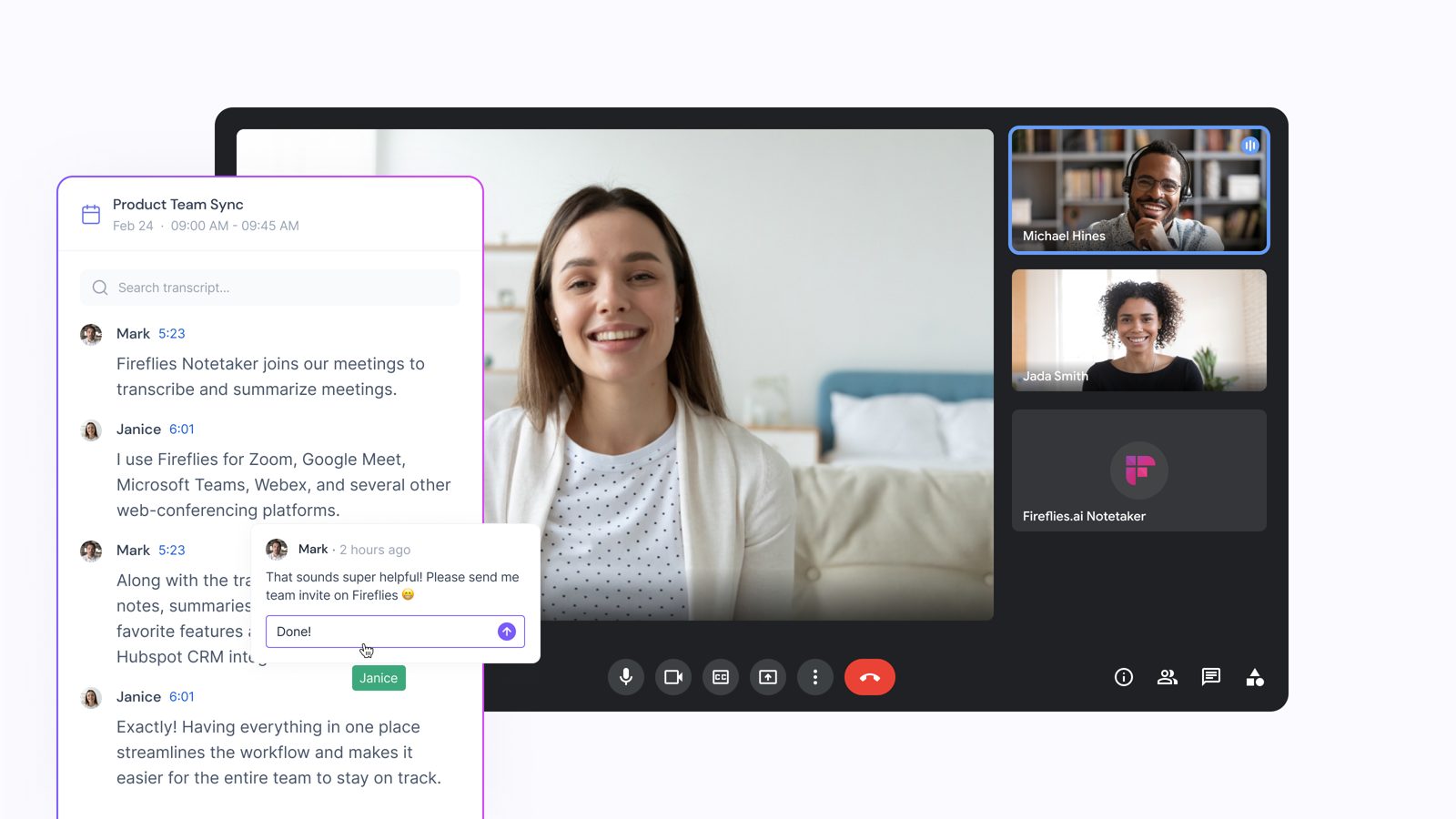
It appears as a participant in Zoom, Meet or Teams and listens for you.
Notes arrive after the call
The summary, action items and full transcript land in your inbox and your apps.
Affiliate link. We may earn a commission if you sign up, at no cost to you.
Ask your meetings anything.
Type a question in plain English, like how many seats a customer wanted. AskFred answers from your calls and shows you the moment it was said.
AskFred uses AI credits. Summaries and transcripts do not.
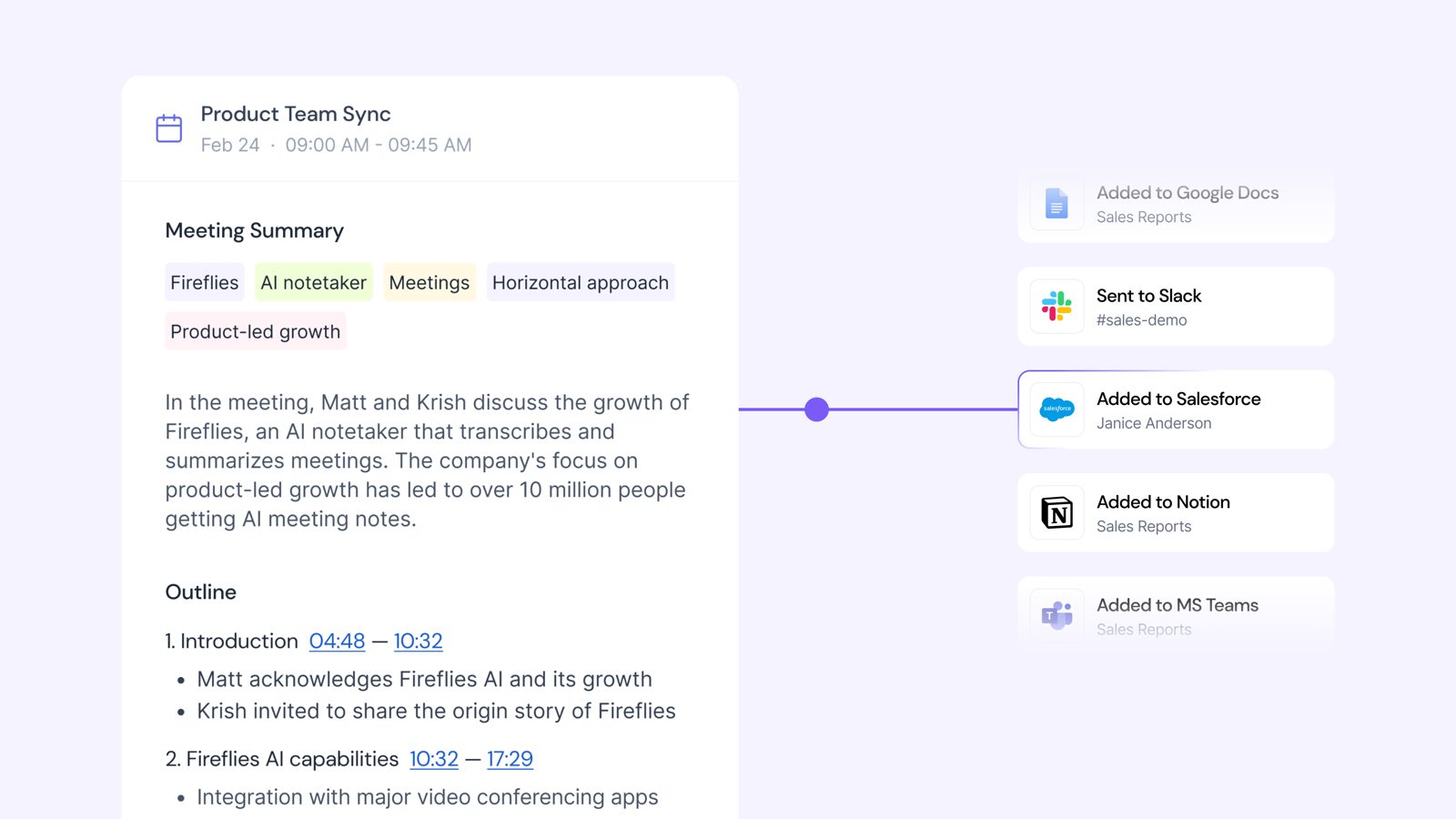
What you get after every call.
A summary you can skim in a minute
Key points, decisions and action items, written for you.
A full transcript with names and timestamps
See who said what, and jump to that moment in the recording.
Search and AskFred
Look up any word across all your meetings. Or ask AskFred a question in plain English.
Notes that go where you work
Over 50 apps, including Slack, Notion, HubSpot and Salesforce.
Security you can explain to your boss
Your data is protected, and you choose which calls Fireflies joins.
SOC 2 Type IIGDPRNo AI training on your data
Who gets the most out of it.
Sales teams
Every call is logged to your CRM with notes and next steps, so nothing slips before the follow-up.
Founders and managers
Stop being the person who writes everything down. Get your time and attention back.
Consultants and agencies
Send clients a clean summary after each call, and prove what was agreed.
Remote teams
People who missed the call can read the notes in two minutes instead of watching an hour of video.
Our honest verdict.
Fireflies is the easiest notetaker to start with, and the free plan is enough to find out if it suits you.
What we liked
- A free plan you can actually use
- Joins your calls on its own
- Clear summaries and action items
- Works in over 100 languages
- Connects to the apps you already use
What could be better
- Pricing is per person, so it adds up for teams
- AI features use separate credits on paid plans
- It joins as a visible participant, so tell people before you record
Start free. Pay only if you need more.
Prices per person, per month, on yearly billing. Checked 5 October 2026.
Free
Summaries and transcripts, 400 minutes of storage and 20 AI credits a month. A good way to try it on real meetings.
Start freePro Our pick
For people with many calls each week. 8,000 minutes of storage, transcript downloads and API access.
Get ProBusiness
For teams that want analytics and CRM workflows. Unlimited storage, team analytics and CRM autofill.
Get BusinessEnterprise
For larger organisations. Adds SSO, SCIM, private storage and HIPAA on request.
See EnterprisePlans and prices change. Check the current details on the Fireflies pricing page before you buy.
Questions people ask.
Is Fireflies really free?
Yes. Yes. The free plan includes summaries and transcripts, 400 minutes of storage and 20 AI credits a month, and needs no credit card. Transcript downloads and team features need a paid plan, which starts at $10 per person per month on yearly billing.
Which meeting apps does it work with?
Zoom, Google Meet, Microsoft Teams and Webex, plus several others. You can also upload recordings.
Do people know it is recording?
Fireflies joins as a visible participant, so people can see it. Tell everyone before you record, and check your local rules on recording calls.
Is my data safe?
Fireflies is SOC 2 Type II and GDPR compliant, and it says it does not train AI on your data. You also choose which calls it joins.
What does AskFred cost?
AskFred is Fireflies' built-in assistant for asking questions about your meetings. AskFred and other advanced AI features use AI credits, so heavy users may need to buy more. Summaries and transcripts do not use credits.
Is it right for everyone?
Not always. If your clients dislike a notetaker joining the call, or you need a tool with no bot at all, look at other options first. For most teams, starting on the free plan is the quickest way to find out.
Your next meeting could take its own notes.
Connect your calendar, join your next call as usual, and read the summary when it ends. It is free to try.
Affiliate link. We may earn a commission if you sign up, at no cost to you.